Eelectron Inwall Pushbutton Interface 6 IN / 2 OUT LED - KNX - D02 | KNX via Matter | BUILD10
BUILD10
Local Service PartnersAI PartnersProduct
About UsContact
BUILD10
← KNX via Matter catalogProject shortlist (0)
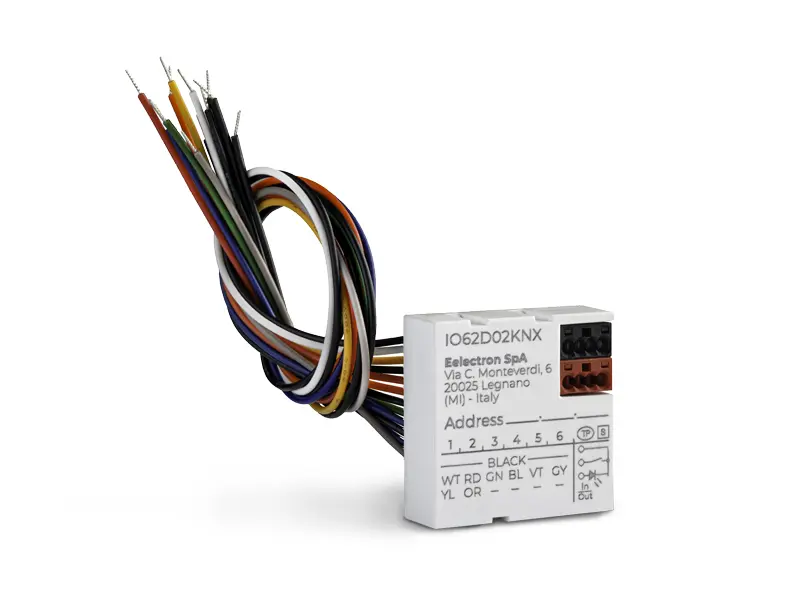
Eelectron Inwall Pushbutton Interface 6 IN / 2 OUT LED - KNX - D02 IO62D02KNX

Eelectron

Eelectron Inwall Pushbutton Interface 6 IN / 2 OUT LED - KNX - D02

KNX wall control for sending configured button commands.

Product type
Buttons & panels
Model / SKU
IO62D02KNX
KNX connection
KNX; consult the exact model documentation and ETS application

Connecting this device to Matter

This product uses KNX. A compatible bridge can expose selected functions to Matter through its IP connection. The KNX device itself does not become a Matter over Thread device.

Functions to map through a bridge

  • Button events

Selected native KNX functions can be mapped using a suitable Matter bridge. Additional probes, contacts, couplers, controlled equipment or temperature controllers may be required as described below. Exact device–bridge combinations have not been tested.

Commission the KNX installation in ETS, then configure the bridge with the required group addresses, data types and status feedback. Check the exact bridge firmware and your Matter platform. Native KNX functions, electrical ratings and Matter functions are separate specifications.

Function mapping is not a tested device–bridge pair or individual Matter certification for this KNX model. Protection functions and essential local automation should remain in the KNX installation.

Bridge options by function

These options match the product’s KNX functions to capabilities documented for a bridge. Open the bridge for its requirements and limitations.

1Home Voice & Visu

Function mapping, not a tested device–bridge pair

Button events

Proposed from documented KNX and bridge function types. Verify the exact ETS application, required command/status objects, KNX Secure access and receiving-app support. This model–bridge pair has not been physically tested.

View mapping source ↗

1Home Server KNX Pro

Function mapping, not a tested device–bridge pair

Button events

Proposed from documented KNX and bridge function types. Verify the exact ETS application, required command/status objects, KNX Secure access and receiving-app support. This model–bridge pair has not been physically tested.

View mapping source ↗

Atios KNX Bridge

Function mapping, not a tested device–bridge pair

Button events

Proposed from documented KNX and bridge function types. Verify the exact ETS application, required command/status objects, KNX Secure access and receiving-app support. This model–bridge pair has not been physically tested.

View mapping source ↗

Technical specifications

Buttons

Registry model / order number
IO62D02KNX

Sources & limitations

Product research reviewed: Nov 5, 2026. This is separate from price, stock and installation-test dates.

Model, firmware & function limitations (5)
  • Configure a bridge-compatible button event object. Display pages, scenes, LEDs and proximity detection are not automatically exported as Matter endpoints.
  • Inputs require the appropriate external switch, contact or temperature probe; the module is not necessarily a complete standalone sensor or thermostat.
  • Product identity and the native function are documented in the official KNX device registry. Matter applicability is an inference from the documented bridge function type, not an exact-SKU compatibility test. Verify the current manufacturer ETS application and required command/status objects before specification.
  • Current production status, availability and price have not been confirmed.
  • Official KNX registry model and function; proposed Matter mapping requires ETS object and bridge validation.
Manufacturer documentation & sources (2)
  • KNX Association — Inwall Pushbutton Interface 6 IN / 2 OUT LED - KNX - D02 ↗Reviewed Nov 5, 2026
  • Eelectron IO62D02KNX technical documentation ↗Reviewed Nov 5, 2026
← Back to resultsOpen project shortlist

© 2026 BUILD10

HomeRecommended DevicesContactPrivacy Policy