MDT Push-button Smart 86 with temperature sensor | KNX via Matter | BUILD10
BUILD10
Local Service PartnersAI PartnersProduct
About UsContact
BUILD10
← KNX via Matter catalogProject shortlist (0)
MDT Push-button Smart 86 with temperature sensor BE-TAS86T.02

MDT

MDT Push-button Smart 86 with temperature sensor

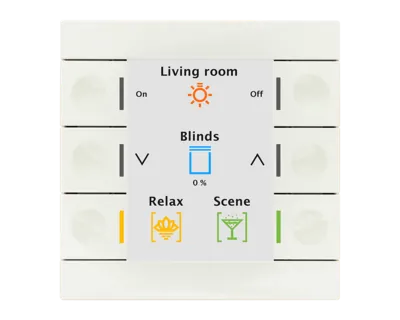
KNX wall control with six mechanical buttons, a colour display and an integrated room-temperature sensor.

Product type
Buttons & panels
Model / SKU
BE-TAS86T.02
KNX connection
KNX TP

Connecting this device to Matter

This product uses KNX. A compatible bridge can expose selected functions to Matter through its IP connection. The KNX device itself does not become a Matter over Thread device.

Functions to map through a bridge

  • Button events
  • Temperature

This is a KNX device, not a native Matter product. Export requires a KNX-to-Matter bridge, ETS group-address configuration and support for the chosen Matter device type. This exact device/bridge combination has not been tested. The display, pages, icons and KNX scenes are not a Matter panel interface. Typically the controlled lights/blinds are bridged as endpoints. Exporting button events requires explicit bridge support and is not guaranteed to appear in Apple Home.

Commission the KNX installation in ETS, then configure the bridge with the required group addresses, data types and status feedback. Check the exact bridge firmware and your Matter platform. Native KNX functions, electrical ratings and Matter functions are separate specifications.

Function mapping is not a tested device–bridge pair or individual Matter certification for this KNX model. Protection functions and essential local automation should remain in the KNX installation.

Bridge options by function

These options match the product’s KNX functions to capabilities documented for a bridge. Open the bridge for its requirements and limitations.

1Home Voice & Visu

Function mapping, not a tested device–bridge pair

Button events · Temperature

The bridge documents these function types. Commission the required KNX command and feedback objects in ETS, then map them in the bridge. Exact model pairing has not been tested; receiving-app support must also be checked.

View mapping source ↗

1Home Server KNX Pro

Function mapping, not a tested device–bridge pair

Button events · Temperature

The bridge documents these function types. Commission the required KNX command and feedback objects in ETS, then map them in the bridge. Exact model pairing has not been tested; receiving-app support must also be checked.

View mapping source ↗

Atios KNX Bridge

Function mapping, not a tested device–bridge pair

Button events · Temperature

The bridge documents these function types. Commission the required KNX command and feedback objects in ETS, then map them in the bridge. Exact model pairing has not been tested; receiving-app support must also be checked.

View mapping source ↗

xxter Pairot

Function mapping, not a tested device–bridge pair

Button events · Temperature

The bridge documents these function types. Commission the required KNX command and feedback objects in ETS, then map them in the bridge. Exact model pairing has not been tested; receiving-app support must also be checked.

View mapping source ↗

Technical specifications

Buttons · Scenes · Temperature · Lighting control · Shading control

Buttons
6 mechanical buttons
Functions
Up to 12 functions on 2 or 3 levels
Display
Colour display with status information
Dimensions
86 × 86 mm front
Temperature sensor
Integrated in BE-TAS86T.02
Power
KNX bus; no additional supply
Mounting
Installation box; no external frame
Commercial status
Stock, destination-specific delivery and current USD price have not been verified.

Sources & limitations

Product research reviewed: Nov 4, 2026. This is separate from price, stock and installation-test dates.

Model, firmware & function limitations (1)
  • The display, pages, icons and KNX scenes are not a Matter panel interface. Typically the controlled lights/blinds are bridged as endpoints. Exporting button events requires explicit bridge support and is not guaranteed to appear in Apple Home.
Manufacturer documentation & sources (2)
  • MDT Push-button Smart 86 with temperature sensor — official product page ↗Reviewed Nov 4, 2026
  • MDT BE-TAS86T.02 technical documentation ↗Reviewed Nov 5, 2026
← Back to resultsOpen project shortlist

© 2026 BUILD10

HomeRecommended DevicesContactPrivacy Policy